Example using MySQL Workbench to create a view (category) for inductors.
1) Create the View in the MySQL database.

Select the parts database as shown below
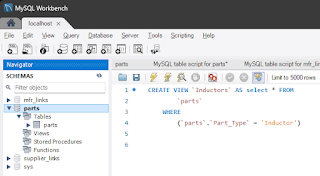
Select +SQL in the ribbon bar below.
It's below File on the menu.

In the SQL Query Tab enter and execute each query separately..
| CREATE VIEW `Resistors` AS select * FROM |
| `parts` |
| WHERE |
| (`parts`.`Part_Type` = 'Resistor') |
| CREATE VIEW `Capacitors` AS select * FROM |
| `parts` |
| WHERE |
| (`parts`.`Part_Type` = 'Capacitor') |
| CREATE VIEW `Inductors` AS select * FROM |
| `parts` |
| WHERE |
| (`parts`.`Part_Type` = 'Inductor') |
2) Edit the DBLib in Altium.
Enable the Views and set the Single Key Lookup for each View.
click on image to view

Install the DBLib Library in Altium
click on image to view

Start placing parts . . .
That's it !
That's it !

