Showing posts with label MySQL. Show all posts

Saturday, December 23, 2023

MySQL - Cloud Hosted Performance Factors

Recommended Configuration for a Parts Altium Database Library Hosted on AWS

db.t4g – General-purpose instance classes powered by Arm-based AWS Graviton2 processors. These instance classes deliver better price performance than previous burstable-performance DB instance classes for a broad set of burstable general-purpose workloads. Amazon RDS db.t4g instances are configured for Unlimited mode. This means that they can burst beyond the baseline over a 24-hour window for an additional charge.

Source AWS:  DB instance classes - Amazon Relational Database Service

MySQL 8.0 Reference Manual :: 1.4 Server and Status Variables and Options Added, Deprecated, or Removed in MySQL 8.0

For best performance MySQL MUST be configured and tuned.

Example innodb configuration:

SHOW VARIABLES LIKE 'innodb_buffer_pool_chunk_size'; 134217728  128Mbits (Default)

SHOW VARIABLES LIKE 'innodb_buffer_pool_instances'; 8 Pool Instances

SHOW VARIABLES LIKE 'innodb_buffer_pool_size'; 1073741824 1GBits (8x Chunk Size)

SHOW VARIABLES LIKE 'innodb_log_file_size'; 134217728 128Mbits

SHOW VARIABLES LIKE 'innodb_flush_method';  O_DIRECT

SHOW VARIABLES LIKE 'innodb_flush_log_at_trx_commit';   1   Faster = 0 or 2

SHOW VARIABLES LIKE 'innodb_file_per_table';  On

SHOW VARIABLES LIKE 'innodb_stats_on_metadata'; Off

SHOW VARIABLES LIKE 'innodb_io_capacity';  200

SHOW VARIABLES LIKE 'innodb_io_capacity_max';  2000

SHOW VARIABLES LIKE 'innodb_log_buffer_size';  8388608  8Mbits

Warning. When you change innodb_log_file_size option you have to remove old log files when restarting server:

service mysql stop
rm /var/lib/mysql/ib_logfile*
service mysql start

Source: Tuning Mysql 8.0 server for performance | by Denys Golotiuk | DataDenys | Medium

Related Links:

Ten MySQL performance tuning settings after installation  Percona

MySQL :: MySQL 8.0 Reference Manual :: 15.8.3.1 Configuring InnoDB Buffer Pool Size

MySQL :: MySQL 8.0 Reference Manual :: 15.8.3.2 Configuring Multiple Buffer Pool Instances

MySQL Performance Tuning 101: Key Tips to Improve MySQL Database Performance

Bard - MySQL Performance on AWS

Bard - MySQL Performance on Azure

vCores: The number of virtual CPUs assigned to the server. More vCores generally mean better performance.

Memory: Available RAM affects query execution, caching, and overall performance.

IOPS: Input/output operations per second represent storage performance. Higher IOPS support faster data access.

MySQL benchmark observations and considerations - Optimizing MySQL Running on Amazon EC2 Using Amazon EBS

Defer disk writes by flushing the log less frequently

By default MySQL will write the log to disk after every single transaction. In our case, it wasn't possible to wrap batches of inserts in transactions, so every single insert query was causing a disk write.

You can instead write the log to disk at an interval by setting innodb_flush_log_at_trx_commit to 2. The main issue with setting this away from the default of 1 is possible data loss. While you're still protected from MySQL crashes causing data loss, the entire server loosing power would mean potentially losing data. For example, if you have the flush interval set to the default of 1, you could lose a seconds worth of writes upon failure of the server.

By setting innodb_flush_log_at_trx_commit to 2, we were able to drop the insert time average from over 200ms to under 50ms. While this is a pretty massive improvement, it's possible to squeeze even more speed if you are willing to risk a few more seconds of potential data loss.

You can increase the flush interval by setting innodb_flush_log_at_timeout to your desired interval (in seconds). In our case, we went with 5 seconds, which resulted in the insert time average dropping under 5ms! A massive difference from the original 250ms, and in our case worth the risk of 5 seconds of potential data loss.

Source: RDS MySQL Performance Tuning - Speeding up slow inserts - atymic.dev

That's it !

Altium DBlib - MySQL Connection String Example

DRIVER={MySQL ODBC 8.0 UNICODE Driver};SERVER=server.com;OPTION=3;PORT=3306;DATABASE=parts;USER=username;PWD=password;PERSIST SECURITY INFO=True;

Change server.com to your Hostname.
Change username and password as needed.

Bug:  If you open an existing DBlib that was connected to Access and edit the connection string for a MySQL connection the connection will most likely fail.  

Solution: Enter the MySQL connection string, then Save, Close and Open the DBLib.

That's it!

Tuesday, March 30, 2021

MySQL - Export Parts Tables to CSV Files

Use Parts > Tools > Export for MySQL

Or tables can be exported using MySQL Workbench.

Right Click on a table and select the Table Data Export Wizard.


Recommended Options for Parts:  

Set File Path and file name to a location on the local machine.

Select csv

Line Separator:  LF (linefeed)

Enclose Strings in: " (double quote)

Field Separator: | (pipe)

Null: Yes

Check export to local machine.

Select Next > Next > Finish

Related Links:  Export to Excel

That's it !

Thursday, January 14, 2021

Amazon RDS - Remote Hosted MySQL Database Libraries and Altium 365

Dispersed teams working remotely can easily collaborate using Altium 365 and a MySQL Database Library hosted on Amazon RDS for their circuit board design projects.

A robust remote library solution can be created by using an Altium 365 Git based project to share symbols and footprints and an Amazon RDS MySQL database for the parametric data.

"MySQL is the world's most popular open source relational database and Amazon RDS makes it easy to set up, operate, and scale MySQL deployments in the cloud. With Amazon RDS, you can deploy scalable MySQL servers in minutes with cost-efficient and resizable hardware capacity.

Amazon RDS for MySQL frees you up to focus on application development by managing time-consuming database administration tasks including backups, software patching, monitoring, scaling and replication.

Amazon RDS supports MySQL Community Edition versions 5.5, 5.6, 5.7, and 8.0 which means that the code, applications, and tools you already use today can be used with Amazon RDS."

Source link: Amazon RDS for MySQL – Amazon Web Services (AWS)

Contact Parts for a demo of a MySQL database library for Altium hosted on Amazon.

That's it !


Tuesday, September 29, 2020

LOAD DATA for MySQL

Load Data can be used to send bulk records from a CSV file to a MySQL table.

The first step is to dump the database records to a utf-8 *.CSV file.

sql - exporting text file with utf-8 encoding in ms access - Stack Overflow

Then use MySQL Load Data. . .

What is LOAD DATA and how does it work | MySQL Server Blog

For Load Data Errors see:

MySQL LOAD DATA LOCAL INFILE on WINDOWS not WORKING - Stack Overflow

Useful MySQL Workbench Query Statements


SET GLOBAL local_infile = 1;
show variables like '%secure_file_priv%';
show variables like 'local_infile';

Pipes are safer than commas or semi-colons

Remote Server
LOAD DATA INFILE 'file'
IGNORE INTO TABLE table
CHARACTER SET UTF8
FIELDS TERMINATED BY '|'
OPTIONALLY ENCLOSED BY '"'
LINES TERMINATED BY '\n'

Local Server

LOAD DATA LOCAL INFILE "file" INTO TABLE tblName CHARACTER SET UTF8 COLUMNS TERMINATED BY '|' OPTIONALLY ENCLOSED BY '"' ESCAPED BY '"';

Other options not shown above include:  Ignore duplicates.

That's it !

Saturday, May 11, 2019

MySQL - Views

Views can be created in MySQL databases to categorize parts.

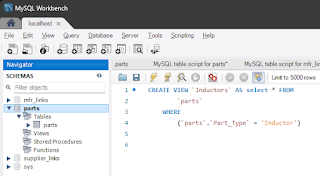
Example using MySQL Workbench to create a view (category) for inductors.

1) Create the View in the MySQL database.


Select the parts database as shown below


Select +SQL in the ribbon bar below. 
It's below File on the menu.


In the SQL Query Tab enter and execute each query separately..

CREATE VIEW `Resistors` AS select * FROM
        `parts`
    WHERE
        (`parts`.`Part_Type` = 'Resistor')


CREATE VIEW `Capacitors` AS select * FROM
        `parts`
    WHERE
        (`parts`.`Part_Type` = 'Capacitor')


CREATE VIEW `Inductors` AS select * FROM
        `parts`
    WHERE
        (`parts`.`Part_Type` = 'Inductor')


2) Edit the DBLib in Altium. 

Enable the Views and set the Single Key Lookup for each View.

click on image to view


Install the DBLib Library in Altium

click on image to view


Start placing parts . . .

That's it !

Tuesday, February 27, 2018

Remote Access

The Part Frontend application supports connections to Microsoft Access and MySQL.


MySQL is designed to work on a Wide Area Network (WAN).

Microsoft Access was designed to be used on a Local Area Network (LAN).
Microsoft Access should not be used across a Wide Area Network (WAN).


Remote MySQL

You can put a MySQL database on a remote server and connect the Parts Frontend to the remote database.


Related Link: See How to Create a Shared MySQL Database

Video Remote MySQL Database for Altium

Migrate to MySQL if you need to work remotely.

That's it.


Sunday, February 4, 2018

How to Create a Shared MySQL Database

You can deploy an Access or MySQL database on your company network behind a firewall and use the Parts Frontend to simplify your library maintenance.

Or you can use a an internet hosted solution, like Amazon RDS.

Parts is a scalable turnkey database library. You can start by using Microsoft Access for your backend database and migrate to MySQL if you need an enterprise solution.

You can install and setup MySQL on your own server or use an online hosting service, like A2 Hosting. or Amazon.

Related Links:

The Parts download includes scripts to create schemas and tables for MySQL.

Monday, November 20, 2017

MySQL Parts - Schemas and Tables

Parts includes dynamic scripts to create schemas and tables for MySQL.

To create the MySQL Scripts  select > Tools > Scripts for MySQL

The MySQL scripts can be used to simplify migration from Access to MySQL.

Using the MySQL Workbench.


Use the MySQL scripts generated in Parts to create MySQL schemas and tables.


MySQL uses lower case table names . . . 

parts
mfr_links
supplier_links

Use MySQL Workbench > File > Open SQL Script, then execute the parts script.

Use  MySQL Workbench > Query > Execute (All or Selection)

Example for the parts schema and table . . .

click on image to view


Then click refresh (see mouse cursor below) ! ! !


Expand the schemas to see the parts table.


Repeat the above steps to create the mfr_links and supplier_links schemas and tables.


See MySQL Connection Strings

Contact Parts for technical support.

That's it !

Sunday, November 19, 2017

MySQL Connection Strings

Create User and Password

Use the MySQL Workbench to create users and set privileges (permissions).

Select Server > User and Privileges


click on image to view


Important %


Set the 'Limit to Host Matching' for the User Privileges to %


click on image to view


Example MySQL Connection Strings for Parts Frontend


ODBC Driver Link: MySQL :: Download Connector/ODBC

Example MySQL ODBC Driver Version 8.04.00.00


Example Local Named Server (localhost)

DRIVER={MySQL ODBC 8.4 ANSI Driver};SERVER=localhost;OPTION=3;PORT=3306;DATABASE=parts;USER=username;PWD=password;PERSIST SECURITY INFO=True;


Remote or Local Server with Static IP Address

DRIVER={MySQL ODBC 8.4 ANSI Driver};SERVER=127.0.0.1;OPTION=3;PORT=3306;DATABASE=parts;USER=username;PWD=password;PERSIST SECURITY INFO=True;

Amazon Web Services

us-west - example connection string

DRIVER={MySQL ODBC 8.4 ANSI Driver};SERVER=partsdb.xxxxxxxxx.us-west-1.rds.amazonaws.com;OPTION=3;PORT=3306;DATABASE=parts;USER=tgsky_altium_rds;PWD=ZaWw2z3q;PERSIST SECURITY INFO=True;

Required Folder Structure for DBLib:

Store the Altium *.DBLib in the same folder as the Footprints and Symbols folders.


click on image to view


Altium DBLib - Example MySQL Connection Strings

DRIVER={MySQL ODBC 8.4 ANSI Driver};SERVER=localhost;OPTION=3;PORT=3306;DATABASE=parts;USER=username;PWD=password;PERSIST SECURITY INFO=True;


Example connection string using an IP Address

DRIVER={MySQL ODBC 8.4 ANSI Driver};SERVER=127.0.0.1;OPTION=3;PORT=3306;DATABASE=parts;USER=username;PWD=password;PERSIST SECURITY INFO=True;


Important  Accent Character `

For MySQL in the Altium DBlib select the Advanced button and enter accent characters for the Left and Right Quote Characters. 


The accent character is the ` key above the Tab key on your keyboard.


Related Links: