Friday, April 10, 2015

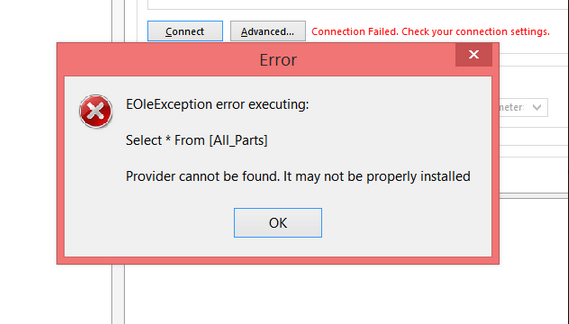
EOleException error executing

Provider cannot be found . . .

EOleException error raised in Altium DBLIB or SVNDBLIB when connecting to an Access Database.

Provider cannot be found. It may not be properly installed.


For AD17 and older 32bit versions of Altium DXP.

To fix this connection error install a 32 bit AccessDatabaseEngine.exe

Download 2010 AccessDatabaseEngine.exe

or
Download 2016 Access DatabaseEngine.exe

Read:

The 'Microsoft.ACE.OLEDB.12.0' provider is not registered on the local machine - ConnectionStrings.com

That's It !


Tuesday, March 31, 2015

User Defined Fields

The Parts Frontend supports up to 15 user defined text fields.

Smart User Defined DigiKey Fields:

SMT Thru-Hole
Size / Dimension
Height - Seated (Max)
Thickness (Max)
Termination
Features


YouTube Video User Defined Fields

A database should not be re-designed while users are connected to the database.


If users are connected to Parts Database ask them to close their Parts Frontend applications and Altium connections while you modify the Parts Database.

To add a user defined field Select Configuration > User Defined Fields, enter the user defined fields and select Apply in the Configuration form.

Note for For MySQL databases User Defined Fields can be added using the Parts Frontend if the user named in the connection string has been given privileges and permissions to alter the MySQL database. 

If the named user does NOT have permissions and privileges an ADO Error Handler message will pop up if the user attempts to alter (add fields) to the database.


Example. . .  to add a field Named Package_Size to the Parts database.

Parts Frontend > Configuration > User Defined Fields. .
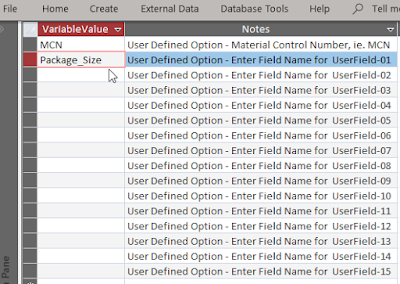


Close the form and select the Apply button in the Configuration dialog to create the fields.

Unbound fields are fields that are not linked to the main form.

To remove unbound fields use Tools > Configuration > Unbound Fields. Or edit the Parts Backend database.

Notes:
Parts configurations can be saved and loaded on local or shared drives.

Related Link: 
Monday, February 23, 2015

Linking Parts

Parts uses a Surrogate Key field (ID) to link the parts placed in an Altium design.

The ID filed is a simple incremented long integer which creates a flexible solution. 

The ID field is a unique identifier.  

The ID field is the Primary key in the Parts Backend table.

No Duplicates are allowed in the ID field.

By design user's do not need to create company part numbers before parts can be placed.

Creating company part numbers can be an exercise in futility.  New designs often have parts that are evaluated and never used in the final design.  

Parts also has a Lifecycle field that includes "Obsolete" and "Deprecated", which allows for identifying these parts in the CAD Library and on the BOM.

Company Part Numbers

Parts has an optional Material Control Number (MCN) field for company part numbers.  

MCNs (company part numbers) are created in PLM systems to associate preferred and alternate manufacturer parts for production BOMs.

Typically company part numbers are assigned after a design has been released from engineering to production.

CAD libraries and schematics can be updated with MCNs using the unique ID field.

Parts has options for customizing the MCN field.

Related Link: PLM

That's It !